

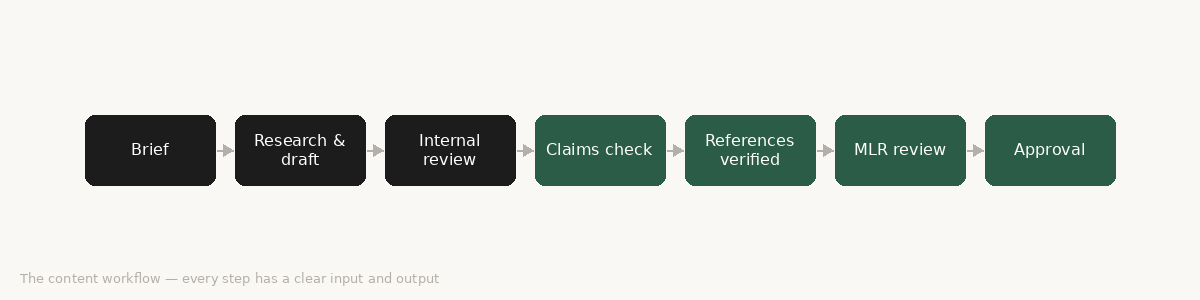
Legend: dark boxes = human judgment required; green boxes = agent-ready steps that follow explicit rules.
Time to stop theorising and open something.
The question I get most often at this point in the conversation is: “Do I need a developer?”
For some things, yes. For your first agent, probably not. The no-code tools have got genuinely good over the past 18 months, and the gap between “I want to build something” and “I have built something” is smaller than most people think.
Here is an honest map of the landscape.
Three tools worth knowing
Zapier AI Agents is the easiest starting point if you already use Zapier for anything. You describe what you want the agent to do, connect it to your existing apps, and the platform handles the wiring. It’s not the most powerful option but the learning curve is shallow enough that you can have something running in an afternoon. Good for: simple trigger-and-action workflows, anything involving email or calendar.
n8n is more powerful and, crucially, self-hostable — which matters in health communications where data governance is not a nice-to-have. It uses a visual workflow builder where you connect nodes together, each node being a step in your process. It has a steeper learning curve than Zapier but gives you significantly more control. Good for: multi-step workflows, anything requiring custom logic, any situation where your data cannot touch a third-party server.
MindStudio sits somewhere between the two. It’s designed specifically for building AI-powered workflows and apps, with a clean interface and enough flexibility for moderately complex builds. Good for: teams that want to build agents without a developer but need more than Zapier can offer.
All three have free tiers that are sufficient for building and testing. None of them require you to write code, though knowing a little doesn’t hurt.
Let’s build something
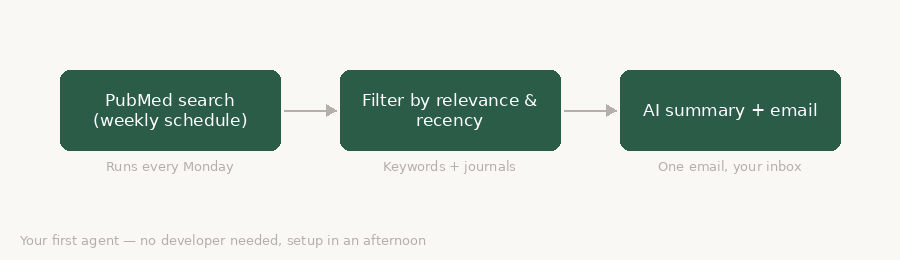
Rather than describe an agent in the abstract, let’s make one. We’re going to build a literature surveillance agent — something that searches PubMed on a schedule, filters for relevant papers, and sends you a weekly summary.
This is a good first build because it’s immediately useful, the logic is simple, and it proves the concept without requiring you to hand any sensitive data to a system you don’t yet trust.
The agent runs every Monday morning. It searches PubMed using a set of terms you define — therapy area, drug name, relevant MeSH headings. It filters the results: anything published in the last 7 days, in journals on your watch list, matching your keywords. It takes the abstracts from the filtered results and asks an AI model to write a short summary of each one — what it found, why it might matter. It sends those summaries to you in a single email.
That’s it. No developer. Setup time: a few hours the first time, less once you know the tools.
To set it up, you need: a Zapier or n8n account, a PubMed API key (free, takes five minutes to get from the NCBI website), an email address to send the output to, and a clear list of your search terms — this is actually the hard bit, not the technical part.
The thing that surprises people
The hardest part of building an agent is not the technology. It is the specification.
To build this literature alert, you need to know exactly what you’re looking for. Which journals matter? Which terms are signal versus noise? What makes a paper worth reading versus worth skipping? How do you want the summary formatted?
These are not technical questions. They are subject-matter questions. And the quality of your answers determines the quality of the agent.
This pattern repeats across every agent you will ever build. The technology executes. The professional decides what good looks like.
Next week we go deeper: a multi-step workflow agent for advisory board preparation, and how to connect the pieces when the logic gets more complex.
Building with agents is a practical series on agentic AI in health communications. New post every week.
— Ned