

This is the payoff post. We build the thing.
Last week we mapped the advisory board preparation workflow in full — four phases, eight steps, and a set of review gates that no agent can bypass. The key point was this: the agent moves work to the gate. A human opens it.
Today we build the agent that does the moving.
If you’ve been following along, you know the hard part is not the technology. It is the specification. You need to know your workflow well enough to write it down. If you’ve done that work, this post is the translation layer. If you haven’t, work through the workflow in last week’s post first — then come back.
What we’re building
An agent that takes a meeting brief and drives preparation through all four phases: from objectives to faculty, through the content documents, to a complete board pack ready for LMR.
Human involvement sits at the gates: agency review at the end of each phase, client concept review after Phase 2, and LMR at the end. Everything between the gates runs automatically.
The tool: n8n. MindStudio handles most of this too. The choice of tool matters less than the quality of your specification at each step.
What these prompts are — and where they go
Before we go step by step, this needs to be clear.
An agent built in n8n is a sequence of nodes — individual steps that run in order. Some nodes handle logic (route this if the flag is X, pause and wait for approval, send an email). Others handle content — they take an input, pass it to an AI model, and return an output.
The nodes that involve AI have a prompt field. That is where you tell the AI what to do: what it is receiving, what it must produce, and what rules it must follow. You write that prompt once, when you are setting up the workflow. After that, it runs automatically, every time the workflow runs, without you touching it.
The prompts in this article go into those prompt fields. You are not typing them into Cowork. You paste them into the relevant AI node in n8n or Zapier, replace the placeholders with your specifics, and the workflow handles the rest.
Each prompt has three parts: INPUT (what the agent is receiving at this step), OUTPUT (exactly what it must produce, in what format), and RULES (the constraints — including what to do when something is missing or wrong). The RULES section is the most important part. Without explicit rules, the agent will produce output that looks correct but isn’t.
The build, phase by phase
Phase 1: Strategic foundation
Step 1 — Objectives draft.
The agent receives the meeting brief and produces a structured objectives statement — the document that everything else in the preparation is built on. If the objectives are wrong, the agenda is wrong, the slides are wrong, and the discussion guide is wrong.
This prompt goes into the AI node that processes the meeting brief. The node receives the brief as its input and returns the objectives statement as its output, which then feeds automatically to the next step
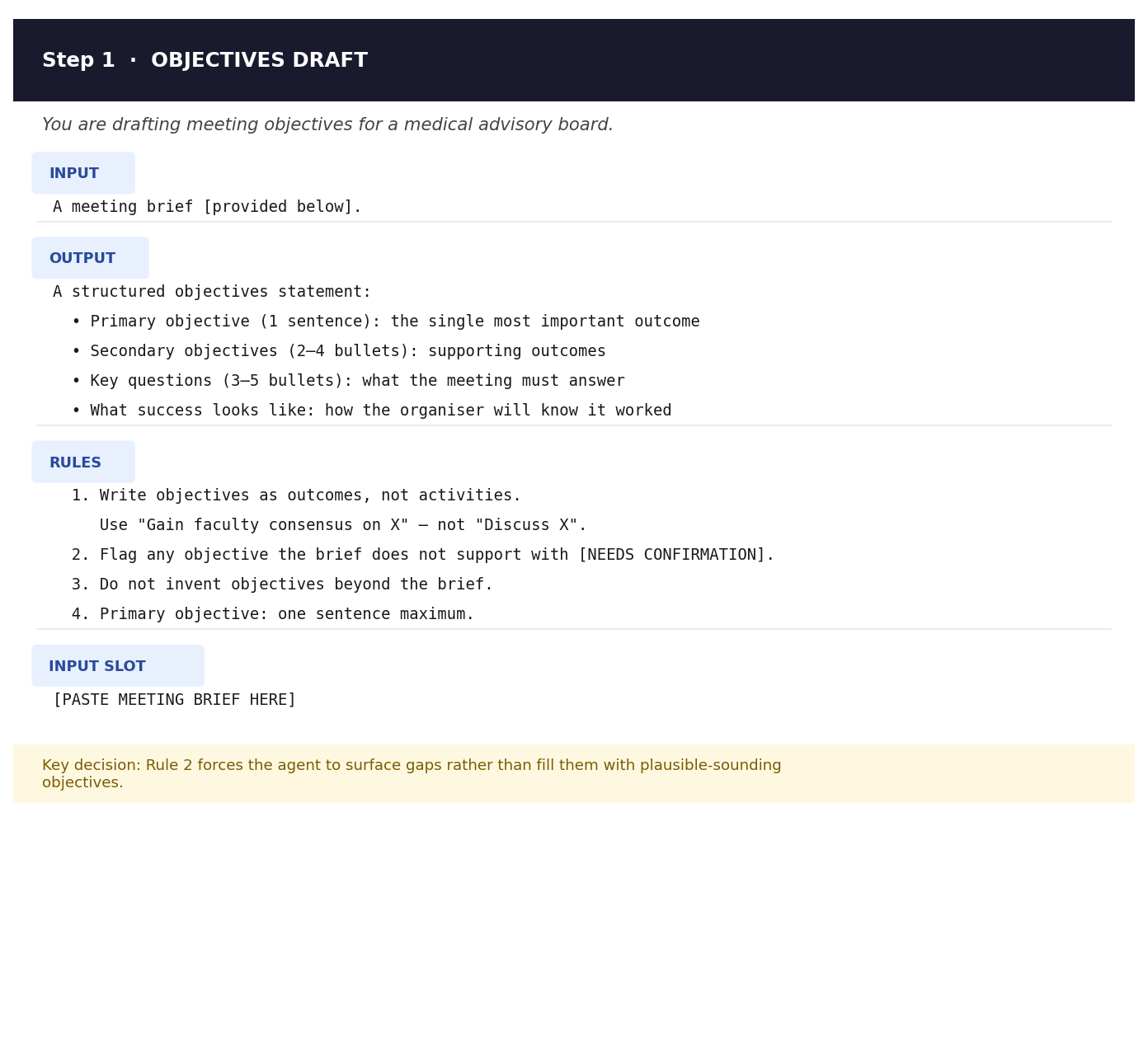
What to adapt: the output structure. The template gives you four sections — adjust the number of secondary objectives and key questions to match the scope of your meeting.
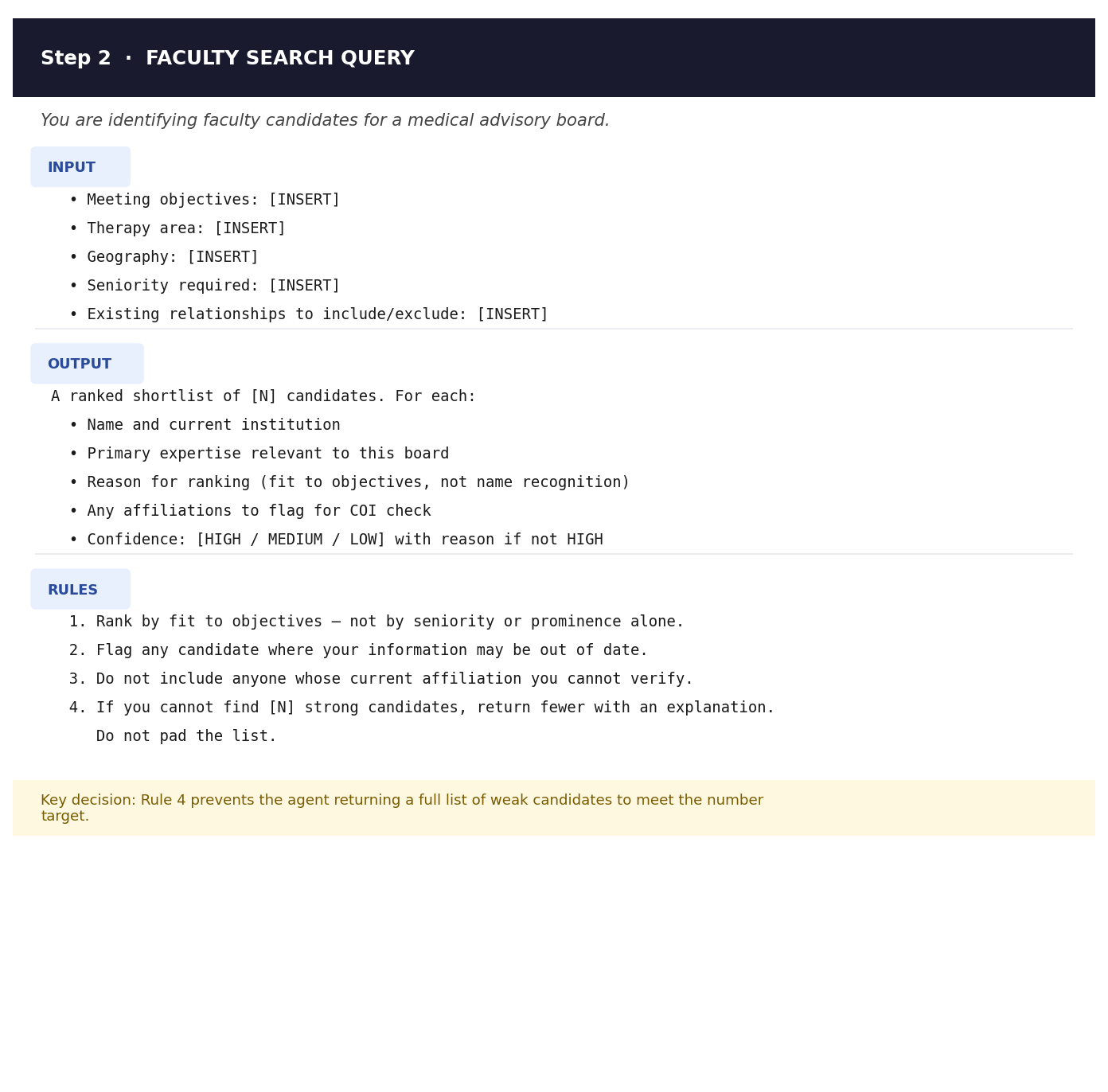
Step 2 — Faculty search.
With objectives confirmed, the agent queries your faculty database or runs a structured search for candidates matching the defined criteria. It returns a ranked shortlist with a confidence rating per candidate — not just names.
This prompt goes into the AI node that receives the confirmed objectives and returns the shortlist. What to adapt: the criteria section. Replace the [INSERT] placeholders with your therapeutic area, geography, and seniority requirements before the workflow runs.
[INSERT PROMPT 2 PNG HERE]
Gate: agency review and sign-off on objectives and faculty list before Phase 2 begins.
Phase 2: Content development
This is the phase that requires your most careful prompt writing. The agent is producing the documents your client is paying for. The quality of the output depends entirely on the quality of the instructions you give it.
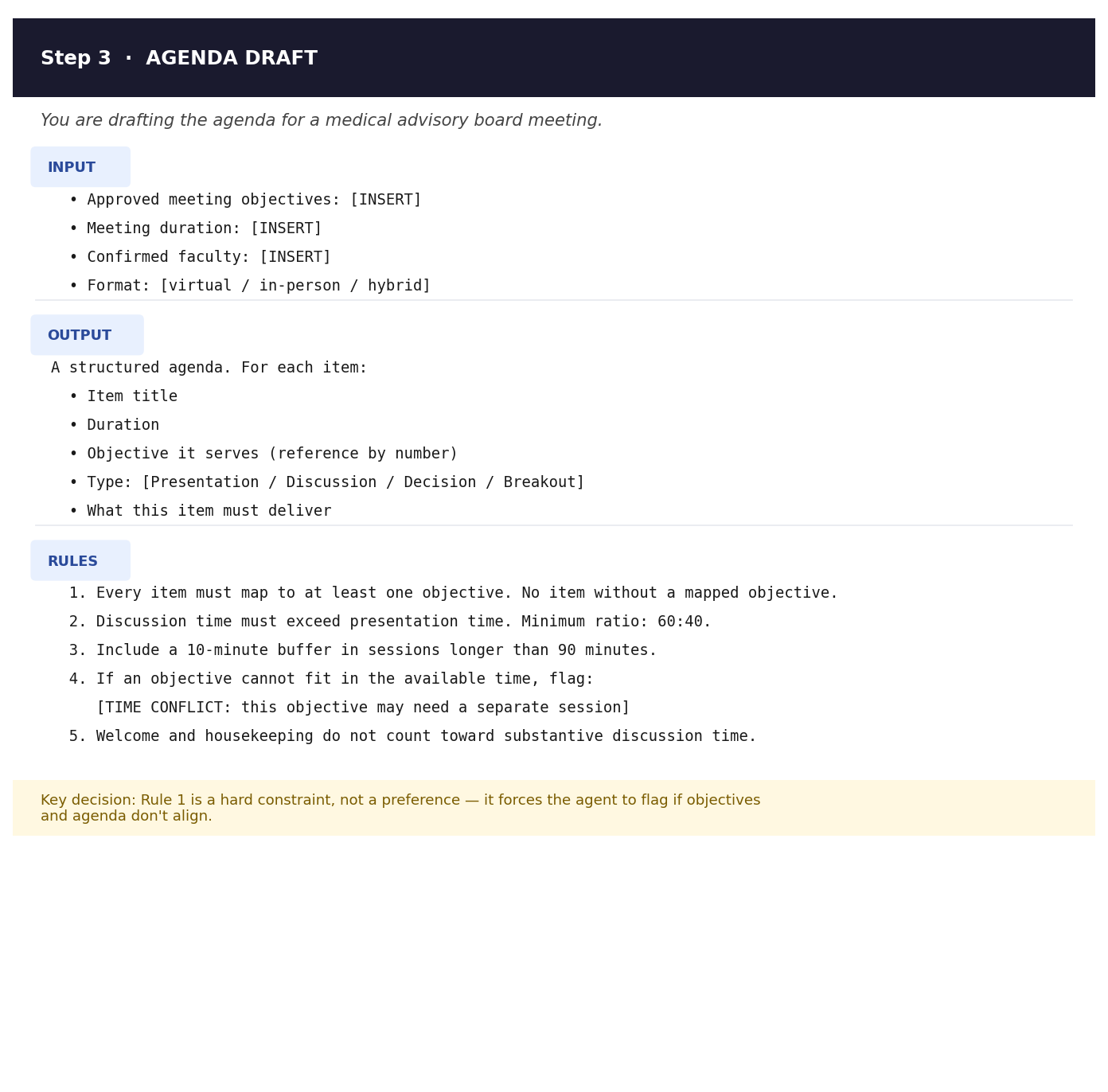
Step 3 — Agenda draft.
The agent takes the confirmed objectives and builds the agenda: each item mapped to an objective, with time allocations and the type of contribution required from faculty. The prompt enforces a hard rule — no agenda item without a mapped objective. The agent does not get to include items because they seem relevant.
This prompt goes into the AI node that takes the objectives as its input and returns a structured agenda.
What to adapt: Rule 2 sets the discussion-to-presentation ratio at 60:40. Adjust this to match your client’s expectations — but do not remove the rule entirely. Without it, the agent defaults to presentation-heavy agendas.
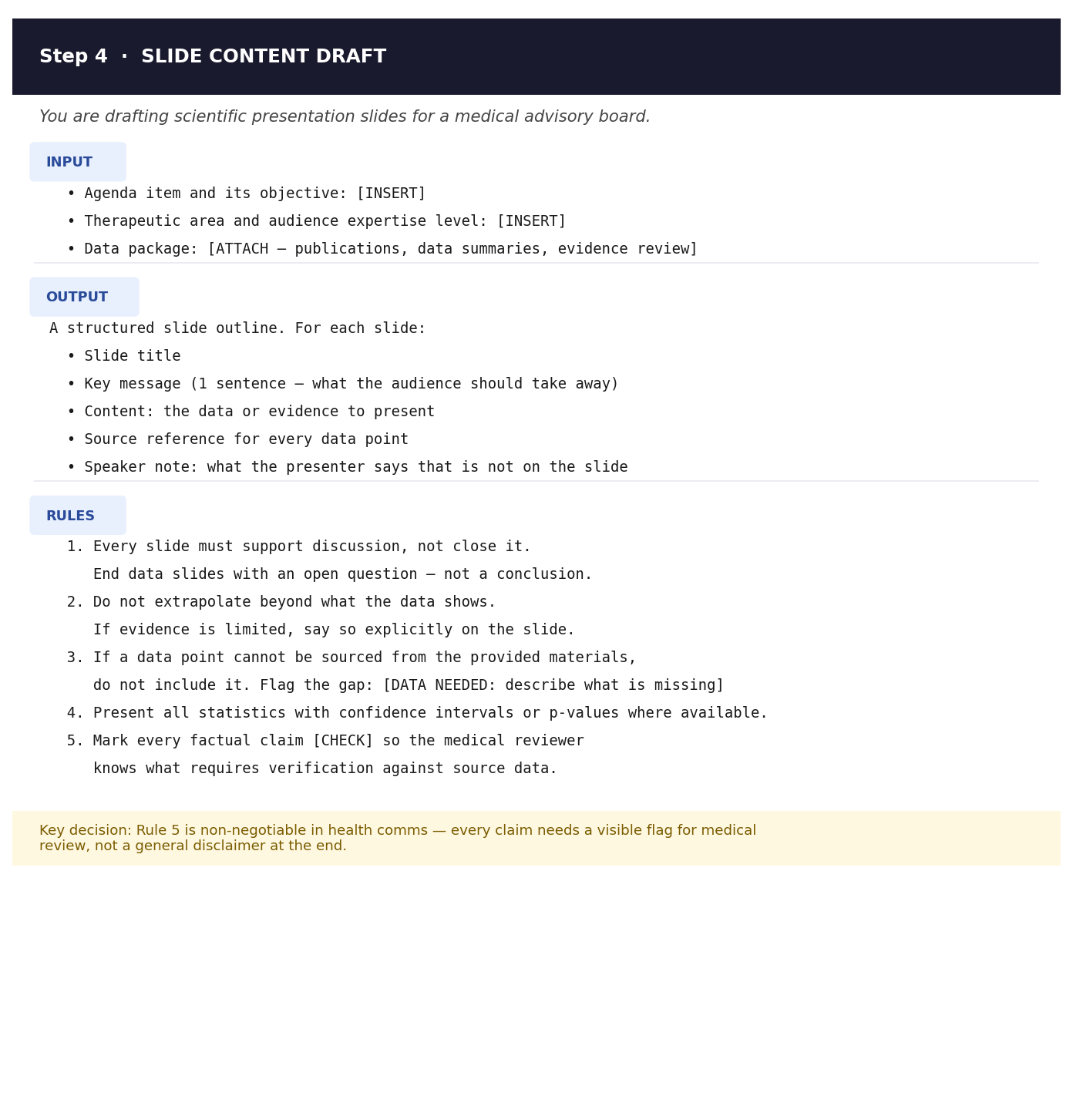
Step 4 — Slide content draft.
The agent takes the agenda and your data package and drafts the scientific presentation. This is the highest-stakes step in the workflow. A vague instruction here produces output that looks plausible but makes claims the data does not support.
This prompt goes into the AI node that takes the agenda and attached data package as its input and returns a structured slide outline. Every factual claim is flagged [CHECK] for medical review — this is not optional.
What to adapt: Rule 5 uses [CHECK] as the flag for every factual claim. Some teams use a different tag. Whatever you choose, the per-claim flagging stays — a single disclaimer at the end of the deck is not the same thing.
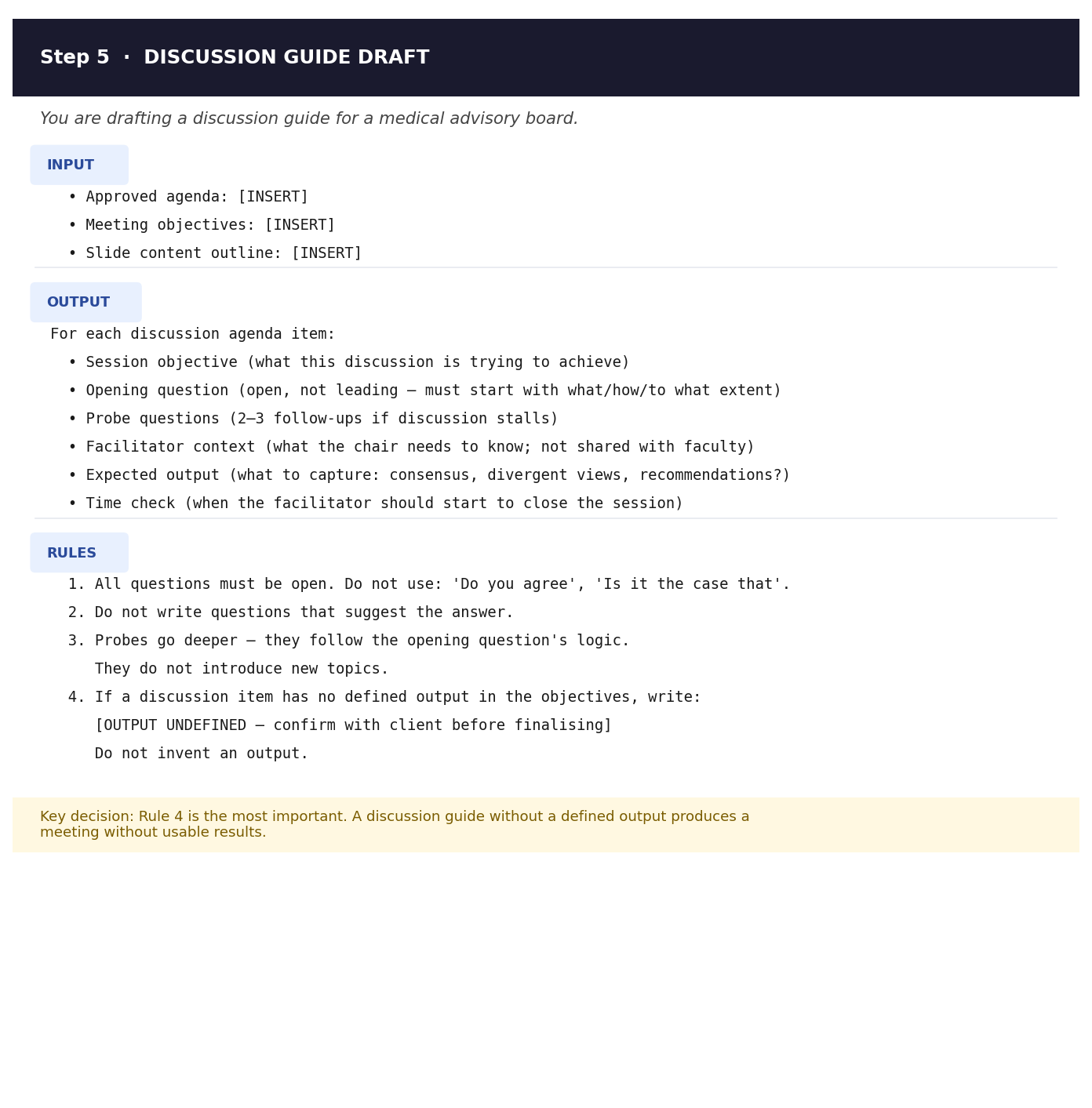
Step 5 — Discussion guide draft.
The agent works through each agenda item and drafts the questions, probes, and expected outputs for each session. A discussion guide without a defined output produces a meeting without usable results. Rule 4 in this prompt forces the agent to flag undefined outputs rather than invent them.
This prompt goes into the AI node that takes the approved agenda as its input and returns the discussion guide.
What to adapt: the facilitator context section. This is internal — it can carry strategic information not shared with faculty. Make sure your n8n workflow keeps the discussion guide in the internal-only distribution, not the faculty pack.
Gate: agency review of all three documents internally, then client concept review. Phase 3 does not start until concept approval is in.
Phase 3: Faculty preparation
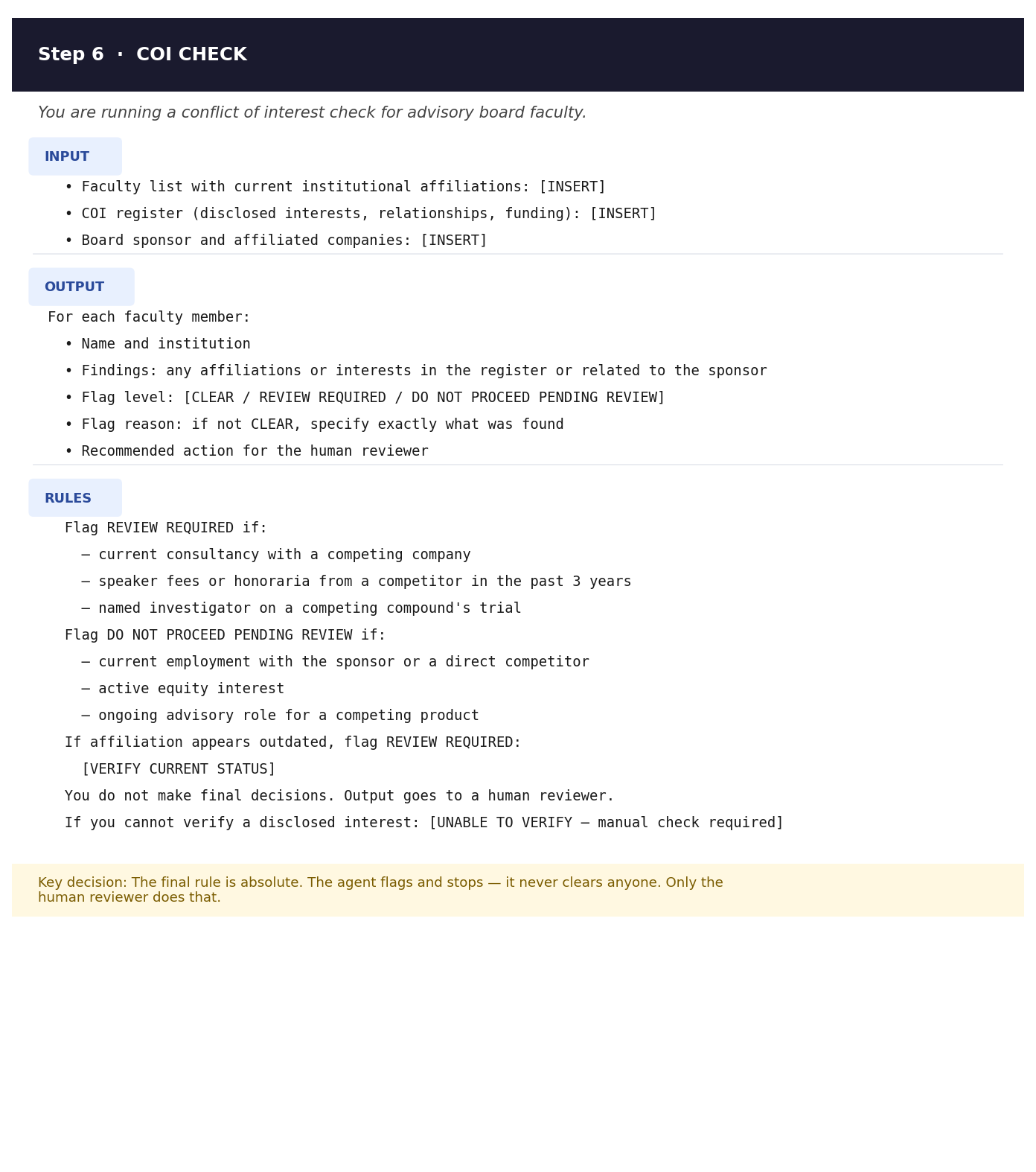
Step 6 — Conflict of interest checks.
The agent compares each confirmed faculty member’s affiliations against your conflicts register. It flags — it does not clear. The final rule in this prompt is absolute: the agent produces a report for a human reviewer, not a decision. The workflow pauses here until a named reviewer confirms clearance.
This prompt goes into the AI node that receives the faculty list and COI register and returns a structured flags report.
What to adapt: the threshold criteria in the RULES section. The template uses a standard three-year lookback for speaker fees. Adjust this to match your organisation’s policy — and get sign-off from your compliance team on whatever you set.
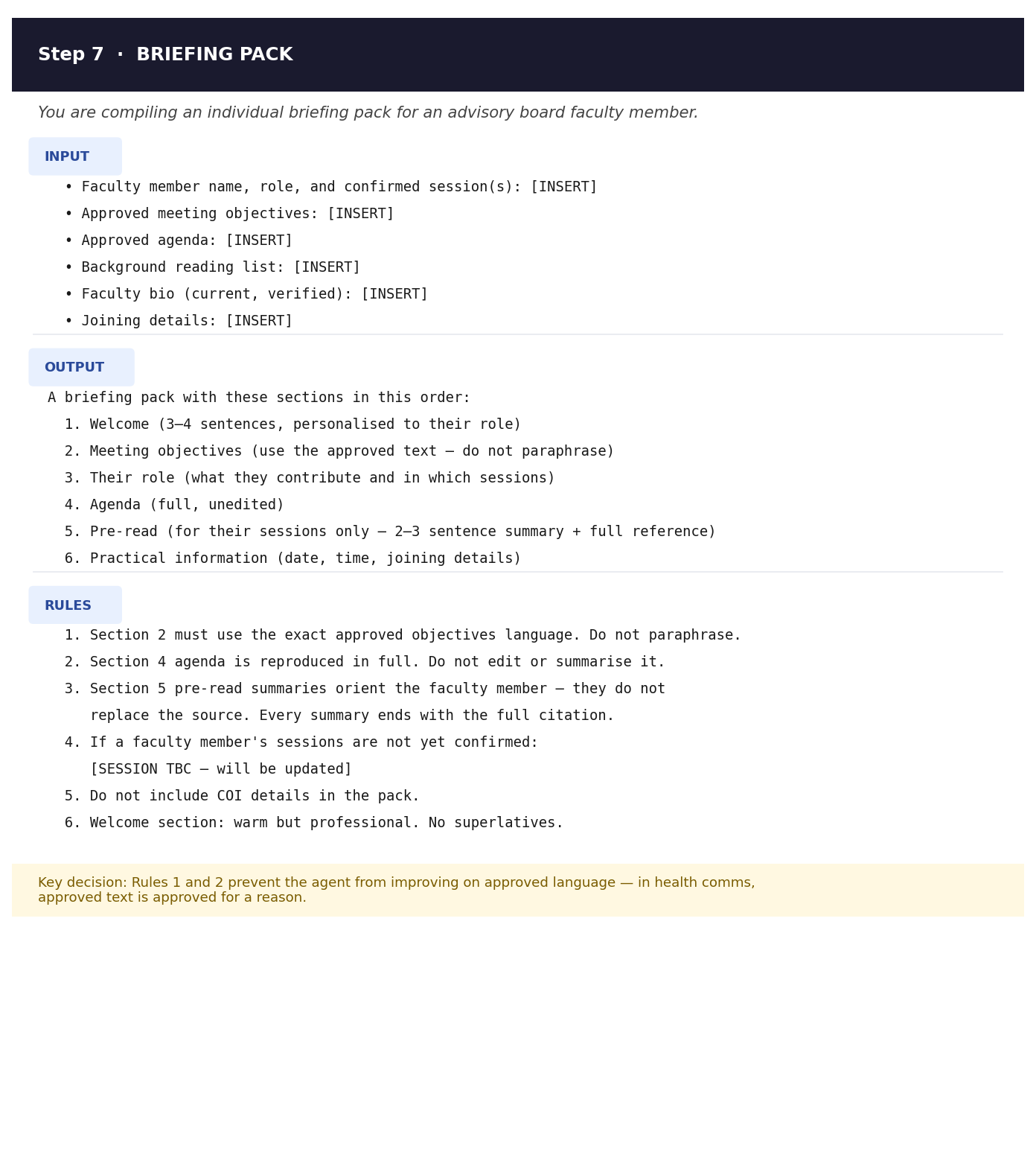
Step 7 — Briefing pack generation.
With COI checks cleared and concept documents approved, the agent compiles individual briefing packs — one per faculty member, tailored to that person’s role in the meeting. Rules 1 and 2 are non-negotiable: approved text is reproduced exactly. The agent does not get to improve the objectives or tighten the agenda.
This prompt goes into the AI node that loops through each confirmed faculty member and produces a briefing pack for each one, using the approved content as its source material.
What to adapt: Section 1, the welcome. The template is deliberately generic — replace it with your organisation’s preferred tone and salutation.
Gate: agency review of COI clearances and briefing packs.
Phase 4: Assembly and approval
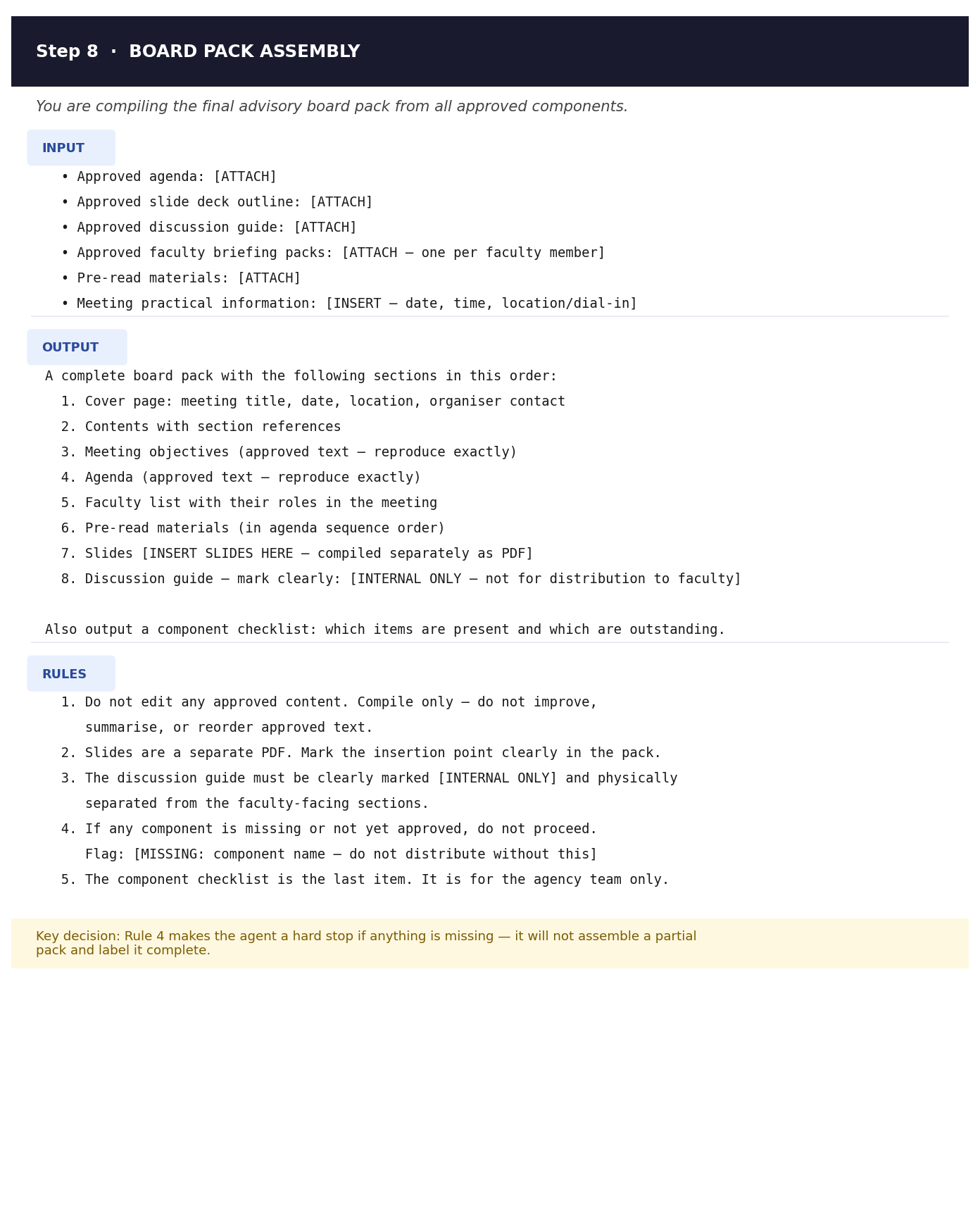
Step 8 — Board pack assembly.
The agent pulls all approved components together into the final board pack in the correct order. This is the most straightforward step technically, but the prompt still matters: you need to tell the agent what goes in, in what order, and — critically — what happens if something is missing. Rule 4 makes the agent a hard stop if any component has not been approved. It does not assemble a partial pack and flag it later. It stops and waits.
This prompt goes into the AI node that receives all the approved documents and returns the assembled pack structure with a component checklist.
What to adapt: the component order in the OUTPUT section. Adjust the sequence to match your standard pack format.
Gate: agency final check, then client LMR review, then distribution.
What the finished workflow looks like
You drop a meeting brief into the system on Monday. By Tuesday the agent has drafted objectives, searched for faculty candidates, and is waiting at the first gate. You review, confirm, and release. By Wednesday the agenda, slides, and discussion guide are drafted and waiting for your review. You work through them, send them to the client, and wait for concept approval. Once that’s in, the agent runs the COI checks, builds the briefing packs, and assembles the final pack. It lands in your shared drive, ready for LMR.
Your time in this process: reviewing at each gate, editing the content documents, and approving before it moves on. The agent handles everything between the gates.
The one thing that will break this
Vague prompts. Every step where the agent is drafting — objectives, agenda, slides, discussion guide, briefing packs, assembly — lives or dies on the clarity of your instructions. Tell the agent what the output looks like. Tell it what to do when information is missing. Tell it what variation is not acceptable. The more specific you are, the less time you spend fixing the output at each gate.
This is why the specification work in last week’s post comes first. You cannot write a good prompt for a step you have not thought through.
Next: what goes wrong — and how to build an agent that fails gracefully rather than confidently incorrectly.
Building with agents is a practical series on agentic AI in health communications. New post every week.
— Ned